Tianna Canchola
Digital Media
Composite

Levitation Composite



Invisibility Composite

Invisibility Composite
Conclusion Questions:
1. In as much detail as possible record the steps it took to complete this project. Start with photographing and end with the editing process in photoshop. Use complete sentences
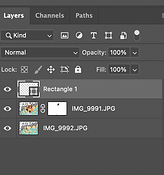
First, you would go to Photoshop and go to the top left your screen click "File" look for "Script". Nexts, you would click "Load files images into stack". Then, something would pop up on you screen and you would see "Browse" click that then you photos would appear, hold down command key to select all the images you want. After that click "Attempt to automatically align source images" and then click ok. You photos should be align, if it is you are going to "Layer" you photos by putting the photo with the person on top of the photo with the same photo but without a person. Then you would click on a square with a circle at the bottom that should be your layer mask. Click on "Layer mask" but also you should be on the photo with the person in order to make changes without messing up the photo. Look on your left screen where it has all your tools, find the "Brush Tool", the brush tool will erase the thing you want to not have there. After all that your pretty much done, to save as a JPEG go to file on the top left you screen chick that go to save as, save to computer, save copy, change format to "JPEG", click ok, then your done.
2. What are layer masks? How do the differ from just using the eraser tool in photoshop?How might you use them in the future to create more projects in photoshop?
Layer is a white mask that you can make changes on with out messing up the photo. Using the eraser tool can eraser things that you want but you can easily mess up and the layer mask can stop that from happening. I can use this in the future to create my own photos if like I need to for people.
3. Do you believe your project was (successful/ unsuccessful). Why?
I believe my project was a successful because my photo looks correct from the steps we did in class. Also I have any understanding on how to work photoshop because I learned all the steps.
4. Based on the learning target, " Practice and demonstrate skills in the manipulation of digital imagery by using photoshop to create a composite image" what level of mastery does your project demonstrate (Exceeds, Meets, Needs Work, minimal understanding). Why do you think? Make sure to provide specific evidence.
The mastery I have is understanding how photoshop works and exceeds in the nexts projects. I think this because I can be a fast learner with somethings, I try my best to learn things I don't know and put my knowledge into it.